Scenario
Imagine a school that has many different student groups and a need to keep track of group memberships. In this tutorial I will show how we can use a Rails app with checkbox inputs in a form to create, update, and delete group memberships.
Before we get started, the target audience for this tutorial is someone who is relatively new to Rails and coming across the problem of creating a many to many relationship via checkbox form for the first time. I try to document the entire process I went through, but one notable gap is the idea of authentication. This tutorial does not cover how to log a user in. For the sake of putting together a speedy demo app, I write a mock that simulates having a current logged in user object.
Database
Here is the schema we are going to be creating:
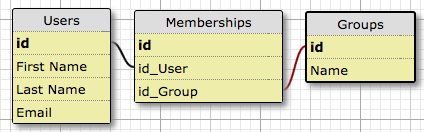
We have a users table that will contain our users or students. We have a groups table that will contain the groups. And then we need a memberships table to hold the many to many student to group relationships. Students can be in many groups and groups can have many students.
SteP 1: Rails New
Create a new Rails app:
rails new many_to_many_checkbox_demo -d postgresql --skip-turbolinks --skip-spring -T
Jump into the new application directory:
cd many_to_many_checkbox_demo/
Step 2: Continue with your favorite Rails setup
Here is what I like to do, but if you have your own opinions just skip to step 3. We'll open our gemfile and add the following gems:
- rspec-rails
- capybara
- shoulda-matchers
- database_cleaner
- factory_girl
- simplecov
- pry
source 'https://rubygems.org'
gem 'rails', '~> 5.0.0', '>= 5.0.0.1'
gem 'pg', '~> 0.18'
gem 'puma', '~> 3.0'
gem 'sass-rails', '~> 5.0'
gem 'uglifier', '>= 1.3.0'
gem 'coffee-rails', '~> 4.2'
gem 'jquery-rails'
gem 'jbuilder', '~> 2.5'

group :development, :test do
  gem 'byebug', platform: :mri
  gem 'pry'
  gem 'rspec-rails'
  gem 'capybara'
  gem 'launchy'
  gem 'shoulda-matchers'
  gem 'database_cleaner'
  gem 'factory_girl_rails'
  gem 'simplecov', require: false
end

group :development do
  gem 'web-console'
  gem 'listen', '~> 3.0.5'
end

gem 'tzinfo-data', platforms: [:mingw, :mswin, :x64_mingw, :jruby]
Run bundle:
bundle
Set up RSpec for Test Driven Development:
rails g rspec:install
Create some RSpec support folders and files:
mkdir spec/support
touch spec/support/factory_girl.rb
touch spec/support/factories.rb
touch spec/support/database_cleaner.rb
Add config data:
In spec/rails_helper.rb
require 'capybara/rails'

Shoulda::Matchers.configure do |config|
  config.integrate do |with|
    with.test_framework :rspec
    with.library :rails
  end
end
Uncomment Dir[Rails.root.join('spec/support/**/*.rb')].each { |f| require f }
Change config.use_transactional_fixtures = true to ... = false
In spec/support/factory_girl.rb
RSpec.configure do |config|
  config.include FactoryGirl::Syntax::Methods
end
In spec/support/database_cleaner.rb
RSpec.configure do |config|

  config.before(:suite) do
    DatabaseCleaner.clean_with(:truncation)
  end

  config.before(:each) do
    DatabaseCleaner.strategy = :transaction
  end

  config.before(:each, :js => true) do
    DatabaseCleaner.strategy = :truncation
  end

  config.before(:each) do
    DatabaseCleaner.start
  end

  config.after(:each) do
    DatabaseCleaner.clean
  end
end
In .gitignore
# Ignore SimpleCov files
coverage
I routinely reference this amazing gist for my default Rails setup, which was created by the brilliant Ryan Flach.
Step 3: Write a User Story
I always start with a test. Always. There are plenty of awesome tutorials on how to set up many to many relationships with check box forms, like this one, but none of them that I have found are driven by testing. Let's start by writing a user story:
As a user
When I visit the membership form
and I check "student government"
and I click "Submit"
Then I am taken to my user profile
and I see my membership: "student government"
Step 4: Implement the story as a test
First, lets create a new feature test directory and create our test file:
mkdir spec/features
touch spec/features/user_creates_membership_spec.rb
In the above file, we add the following feature test describing what we will next implement:
require 'rails_helper'

RSpec.describe "user creates group membership" do
  scenario "by checking checkboxes in the membership form" do
    #test setup: create a user in the database, create a group
    user = create(:user)
    group = create(:group)
    # Go to the new membership form
    visit new_membership_path
    # find the checkbox for the group we just created and check it
    # we find the checkbox by the id of the checkbox, which is set to
    # the id of the group
    find("##{group.id}").set(true)
    # submit the form
    click_button "Save changes"
    # Expect the current page to be the user profile page
    expect(current_path).to eq(user_path(user))
    # Look inside the div with id memberships
    within "div#memberships" do
      # expect to find the name of the group that we just added
      expect(page).to have_content(group.name)
    end
  end
end
Step 5: Run the test
Before we run the test, we have to create our test database:
rake db:create
Lets run the above test in our terminal:
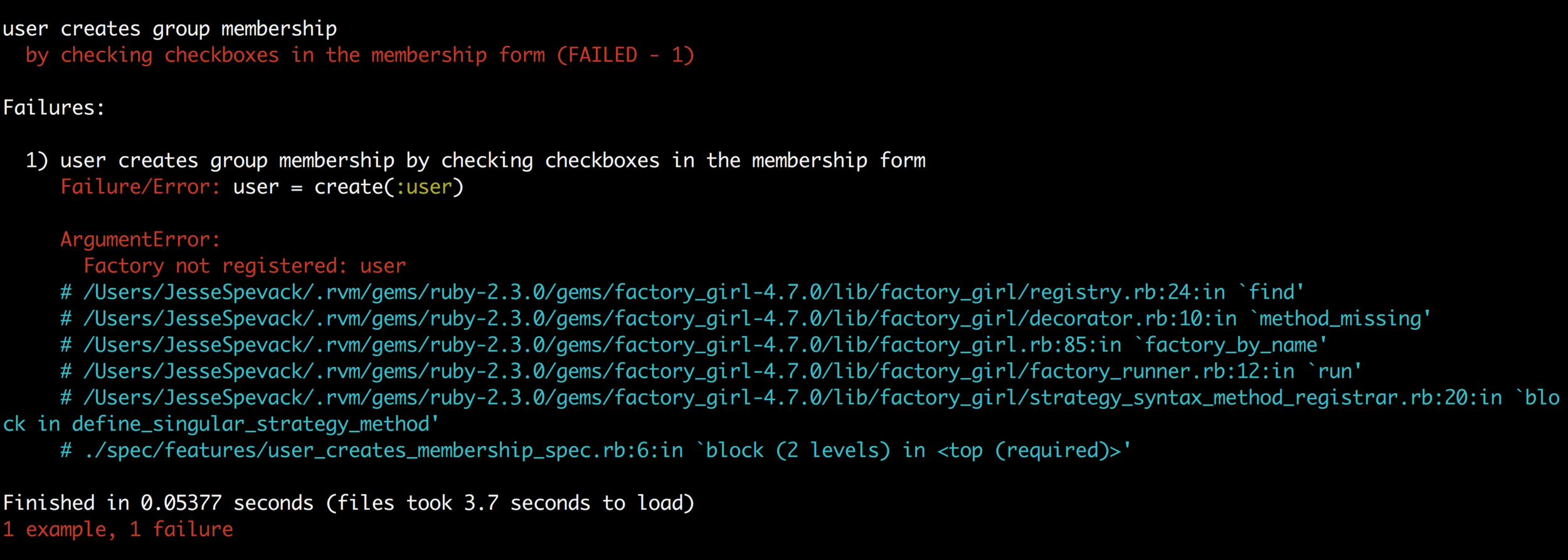
rspec ./spec/features/user_creates_membership_spec.rb
Step 6: Setup our models
The errors above show that it is time to set up our models so let's do:
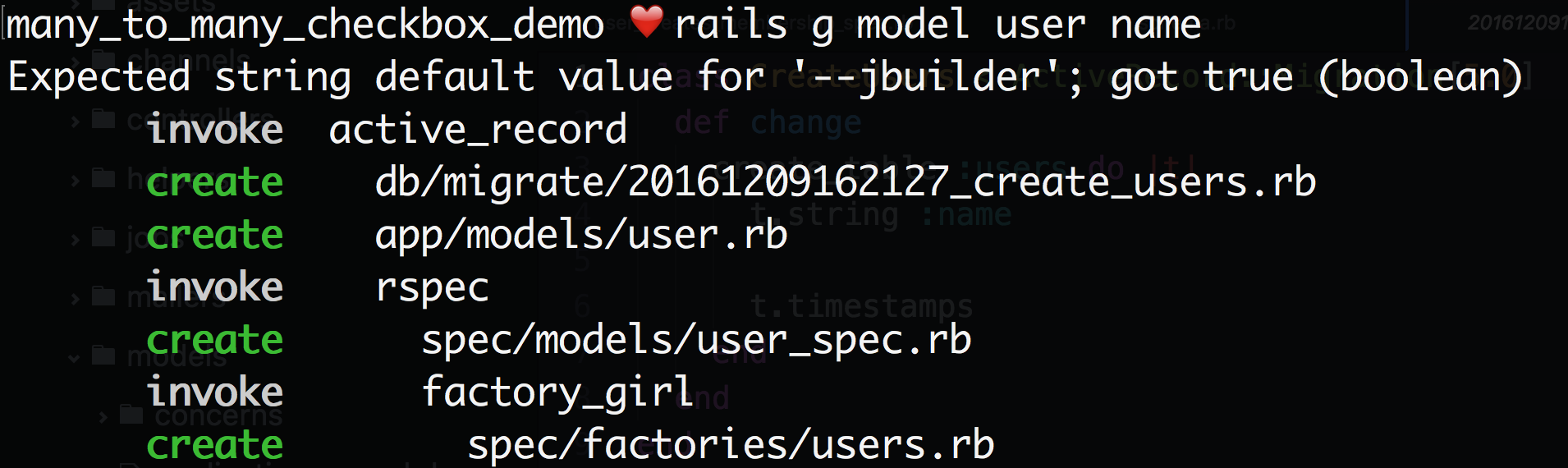
rails g model user name
This will create our database migration, model, and factory girl files:
Next, run the migration:
rake db:migrate
Next we will create our group model:
rails g model group name
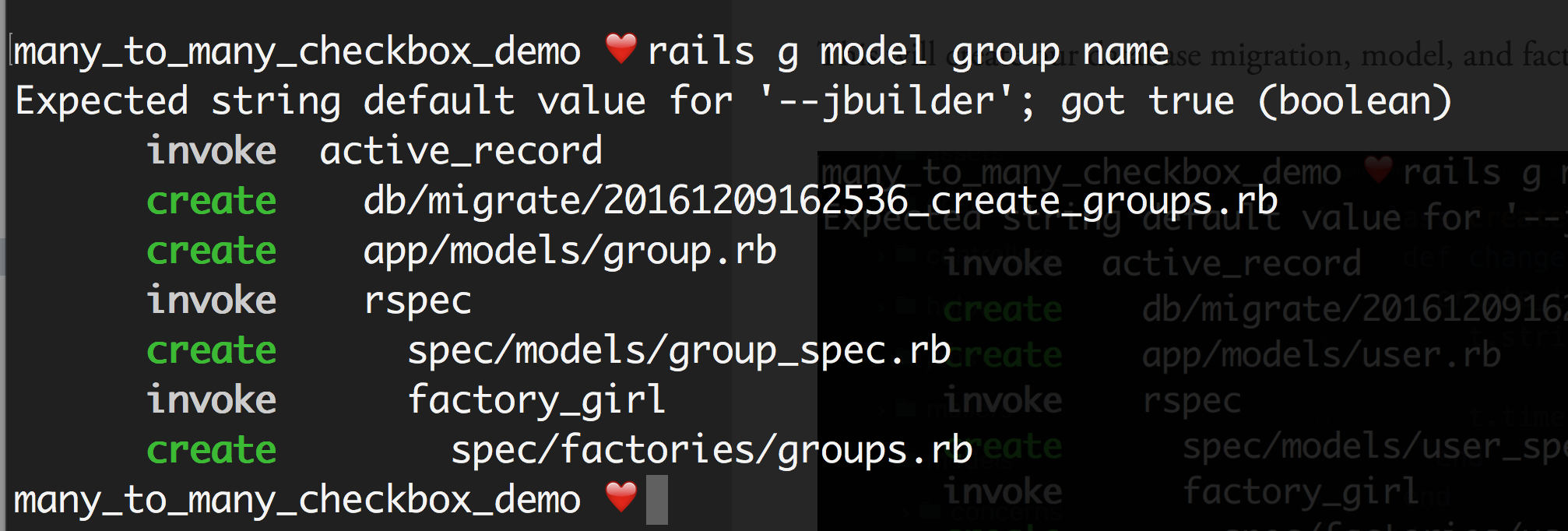
And then run the migration.
rake db:migrate
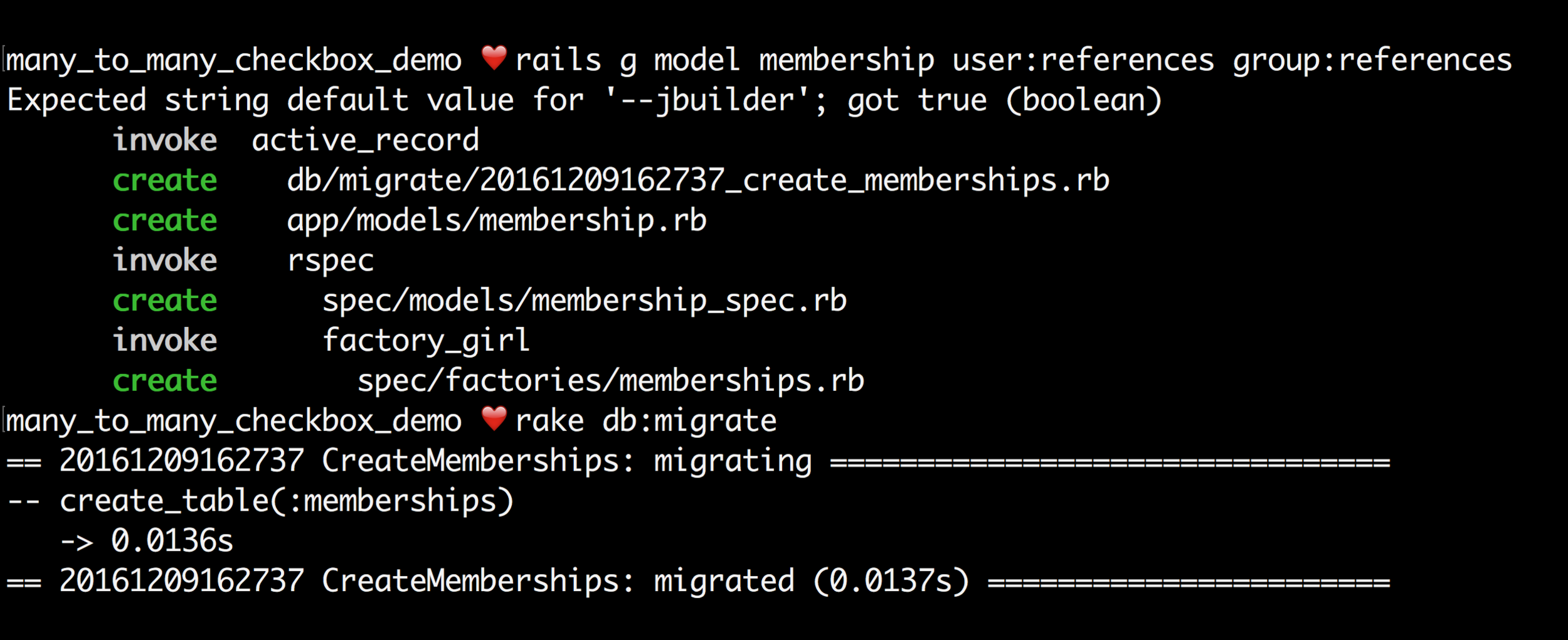
And then we will create the join table:
rails g model membership user:references group:references
And then run the migration.
rake db:migrate
In our factories we will add:
# spec/factories/users.rb
FactoryGirl.define do
  factory :user do
    name "Bob"
  end
end
# spec/factories/groups.rb
FactoryGirl.define do
  factory :group do
    name "Student Council"
  end
end
# spec/factories/memberships.rb
FactoryGirl.define do
  factory :membership do
    user
    group
  end
end
Step 7: Write some model tests
In our user model specs we will add:
# spec/user_spec.rb
require 'rails_helper'

RSpec.describe User, type: :model do
  it {should have_many(:memberships)}
  it {should have_many(:groups).through(:memberships)}
end
# spec/group_spec.rb
require 'rails_helper'

RSpec.describe Group, type: :model do
  it {should have_many(:memberships)}
  it {should have_many(:users).through(:memberships)}
end
# spec/membership_spec.rb
require 'rails_helper'

RSpec.describe Membership, type: :model do
  it {should belong_to(:user)}
  it {should belong_to(:group)}
end
And when we run our freshly written tests, we get:
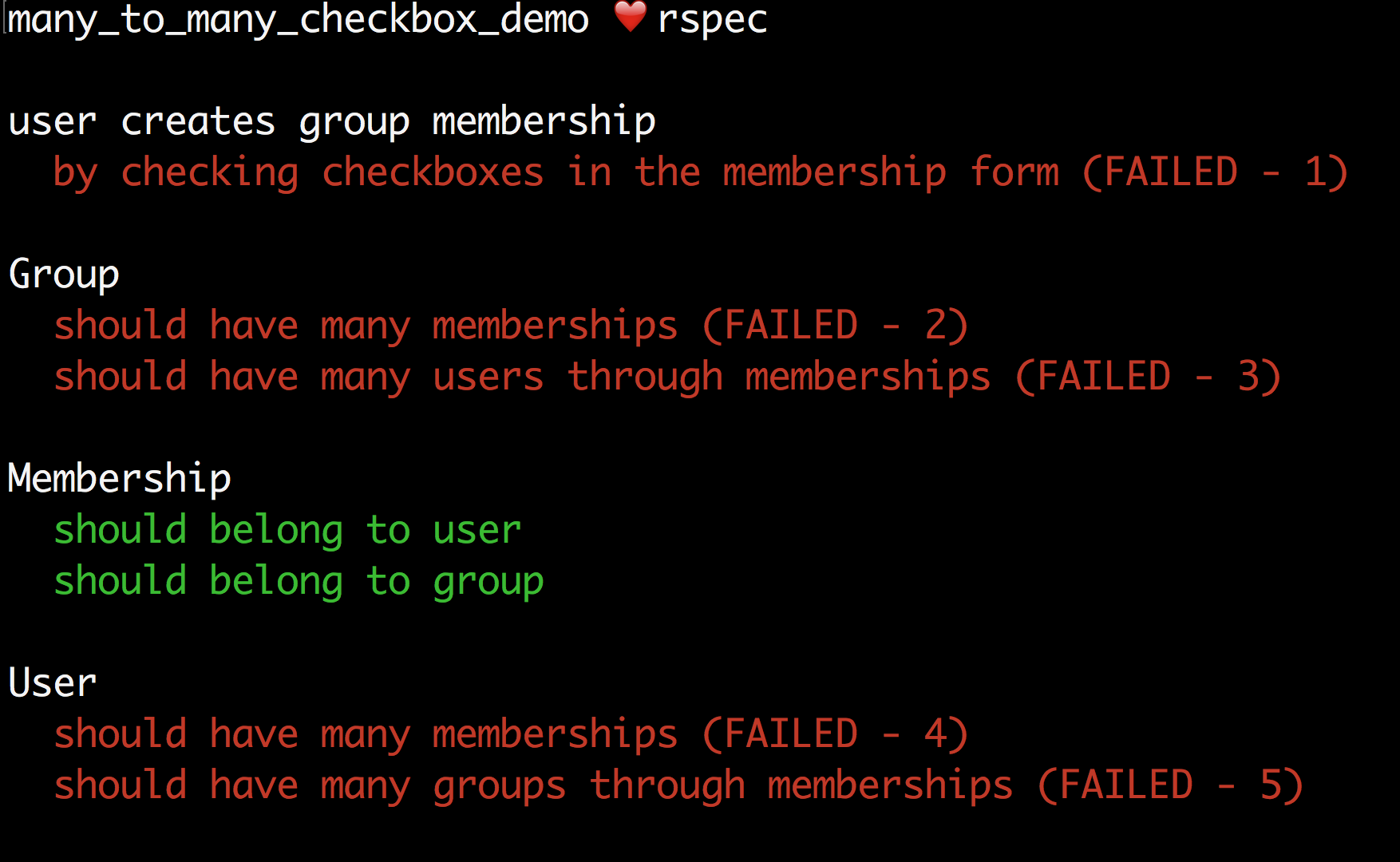
Now it's time to pass our tests!
Step 8: Implement our Models
This feels like cheating.
# app/group.rb
class Group < ApplicationRecord
  has_many :memberships
  has_many :users, through: :memberships
end
# app/membership.rb
class Membership < ApplicationRecord
  belongs_to :user
  belongs_to :group
end
# app/user.rb
class User < ApplicationRecord
  has_many :memberships
  has_many :groups, through: :memberships
end
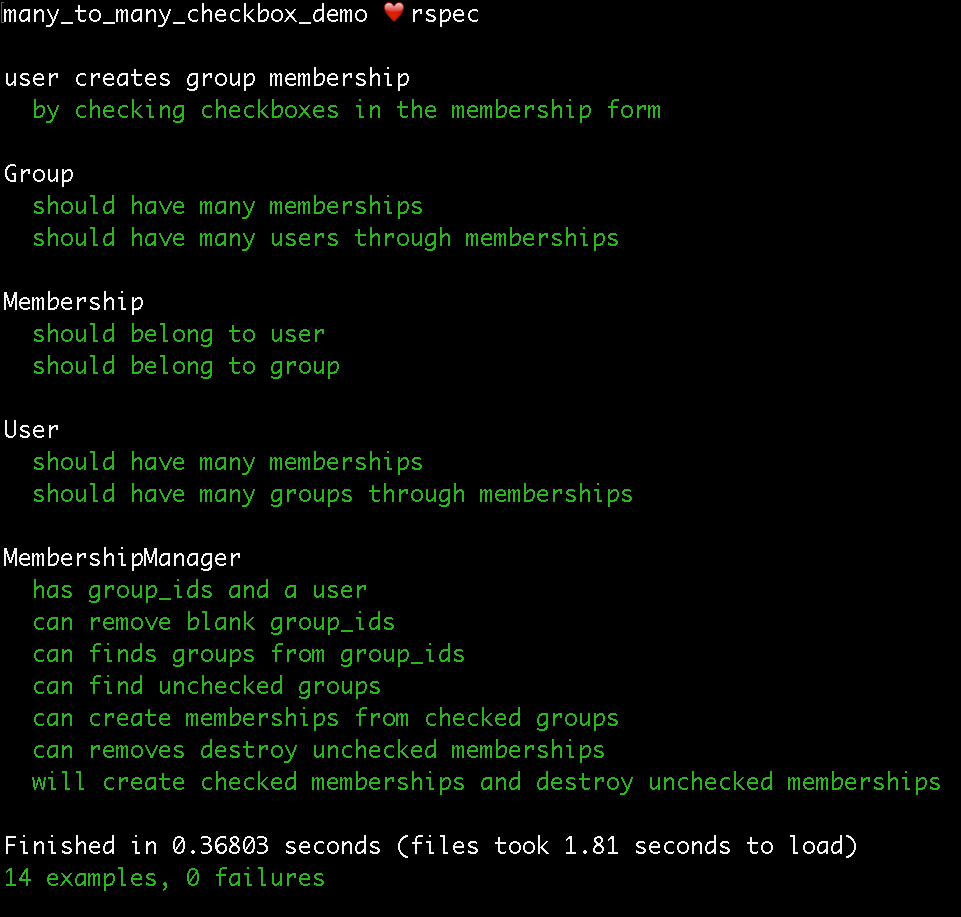
And when we run our test suite we get:
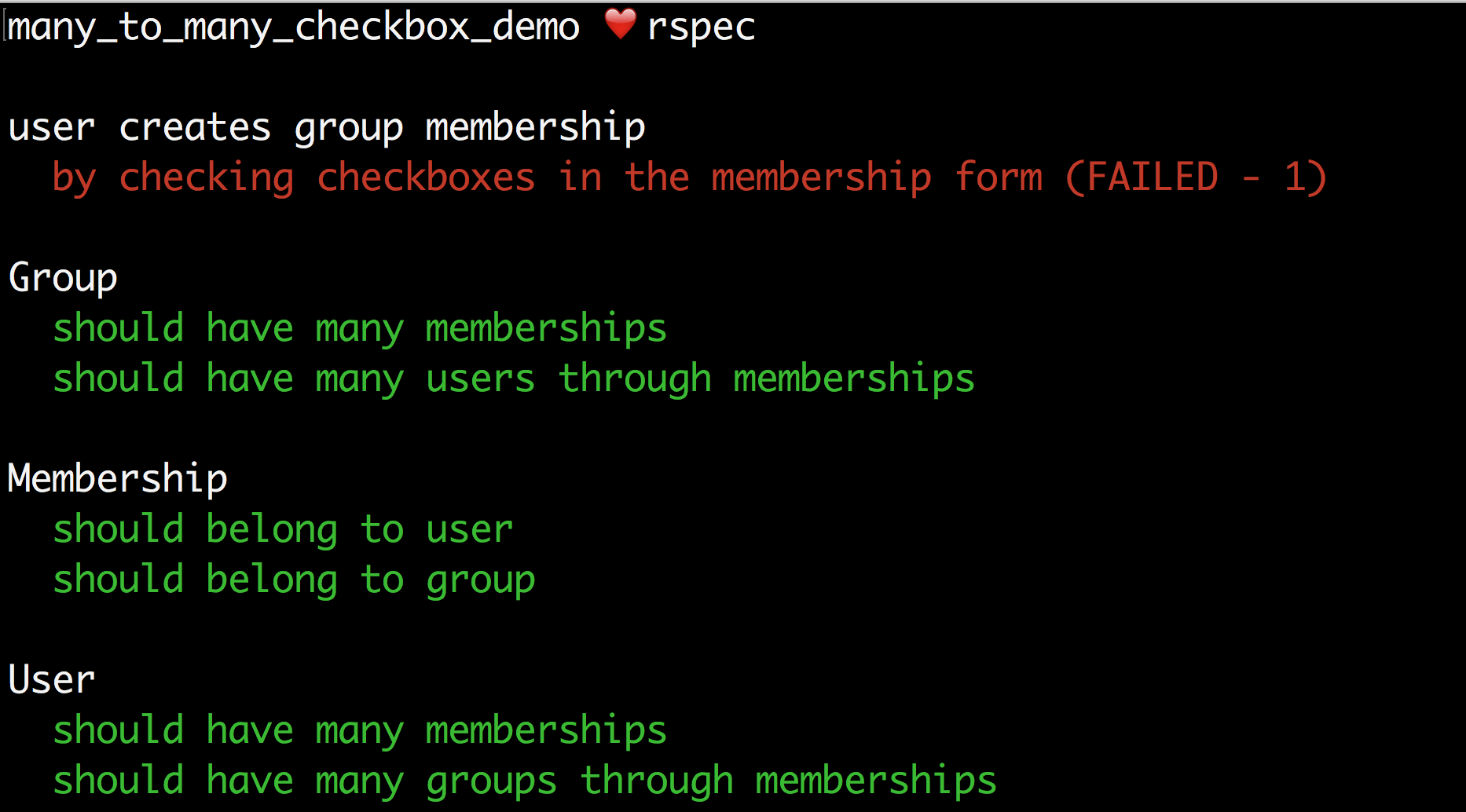
Step 9: Create a Route
Let's look at our failing test:

The error is telling us that the route we call in the feature test, "new_membership_path", is not defined. So let's define it:
# config/routes.rb
Rails.application.routes.draw do
  resources :memberships, only: [:new]
end
This will create the following route:

And then we run our test.
Step 10: Create a Controller
Our test tells us that we need to create a membership controller:
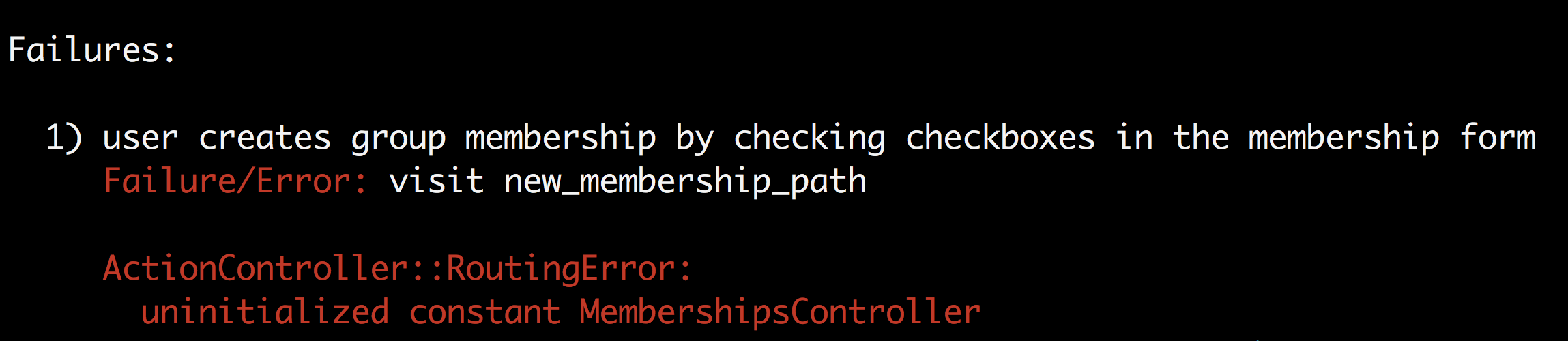
So let's go ahead and create one:
touch app/controllers/memberships_controller.rb
We know that we will need to have a new method because that is what our route is expecting, so we will add the following code to the controller file we just created:
# app/controllers/memberships_controller.rb
class MembershipsController < ApplicationController
  def new

  end
end
And run our test:
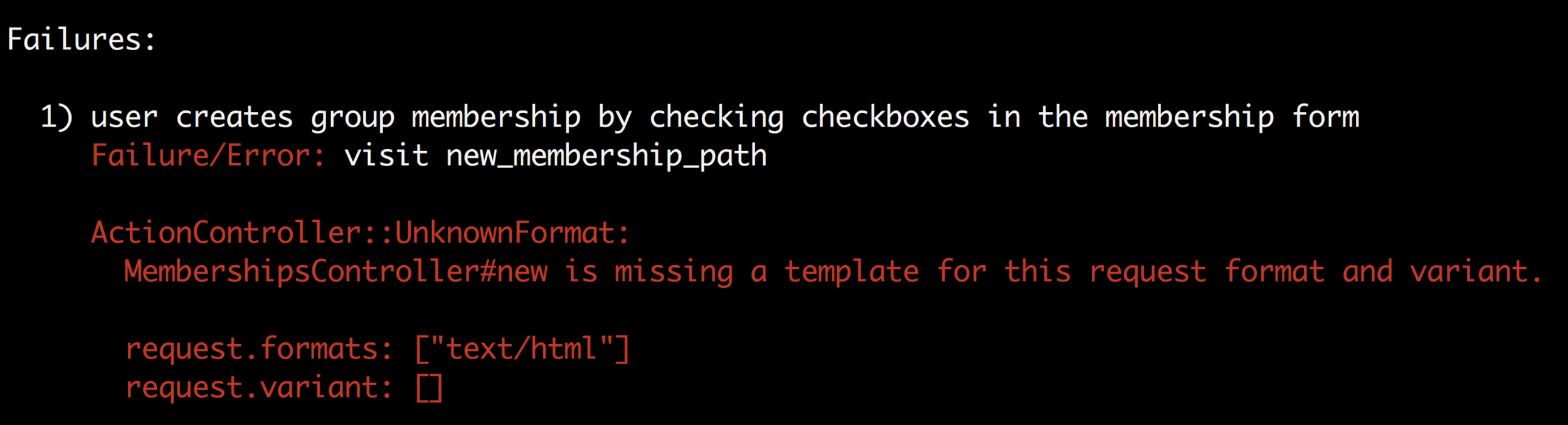
Step 11: Create a Form
Our test tells us that it is missing a template, which means that we need a form view. We can create one by:
mkdir app/views/memberships
touch app/views/memberships/new.html.erb
Now is also a good time to add a little Bootstrap to our project just to make our views a little more readable than what we get from basic HTML.
To do that, and in the interest of speed, I add the CDN's (content delivery network) to my application.html.erb file like so:
<!DOCTYPE html>
<html>
  <head>
    <title>ManyToManyCheckboxDemo</title>
    <%= csrf_meta_tags %>
    <%= stylesheet_link_tag    'application', media: 'all' %>
    <%= javascript_include_tag 'application' %>
    <%= stylesheet_link_tag "https://maxcdn.bootstrapcdn.com/bootstrap/3.3.7/css/bootstrap.min.css",
        integrity: "sha384-BVYiiSIFeK1dGmJRAkycuHAHRg32OmUcww7on3RYdg4Va+PmSTsz/K68vbdEjh4u",
        crossorigin: "anonymous" %>
    <%= stylesheet_link_tag "https://maxcdn.bootstrapcdn.com/bootstrap/3.3.7/css/bootstrap-theme.min.css",
        integrity: "sha384-rHyoN1iRsVXV4nD0JutlnGaslCJuC7uwjduW9SVrLvRYooPp2bWYgmgJQIXwl/Sp",
        crossorigin: "anonymous" %>
    <%= javascript_include_tag "https://maxcdn.bootstrapcdn.com/bootstrap/3.3.7/js/bootstrap.min.js",
        integrity: "sha384-Tc5IQib027qvyjSMfHjOMaLkfuWVxZxUPnCJA7l2mCWNIpG9mGCD8wGNIcPD7Txa",
        crossorigin: "anonymous" %>
  </head>

  <body>
    <%= yield %>
  </body>
</html>
Next, we can add the following code to our view: app/views/memberships/new.html.erb
<h1>Memberships</h1>
<div class="container">
  <div class="col-md-6 col-md-offset-3 text-center">
    <%= form_for @memberships do |f| %>
      <% Group.all.each do |group| %>
        <div class="form-group text-left">
          <%= check_box_tag group.id,
              group.id,
              @user.groups.include?(group),
              :name => 'user[group_ids][]',
              class: "form-control" %>
          <%= label_tag group.id, group.name %>
        </div>
      <% end %>
      <%= submit_tag %>
    <% end %>
  </div>
</div>
In the above code we are doing a couple of things that are worth looking at more closely.
First we create a header, "Memberships". We set up two divs with a few Bootstrap classes to make our form spacing look nice. Then we get into the form itself. We use the instance variable memberships in the start of our form_for. Then we iterate over each Group object and create a checkbox for each group.
The check_box_tag method is a helper function available in Rails. The first argument is the id of the checkbox input we are creating. We set that to the id of the group represented by the checkbox. The second argument is the name of the checkbox input we are creating.
The third argument is a boolean that we are used to set the value of the checkbox. If the user is already a part of the group, we will get true and the checkbox will render as checked. If the user is not a part of the group, we will get false and the checkbox will render as unchecked. In a real project we would have a plan for authenticating users so that when a user visited this form, we would know who they are. That's a bit beyond the scope of this post, so instead we'll just mock a user in our test, which I will show in the next section.
Next we store the resulting checkbox values corresponding to all the checkboxes in an array nested within a hash with the key "name". We need to have all the checkbox values in an array that we can then iterate over and create or destroy the corresponding membership. Setting up the checkboxes is probably the trickiest part of the entire project and my intended biggest value add for this tutorial.
In addition to creating checkboxes, we also add labels so that our user knows what they are checking. We also add a submit button.
When we run our test we get:
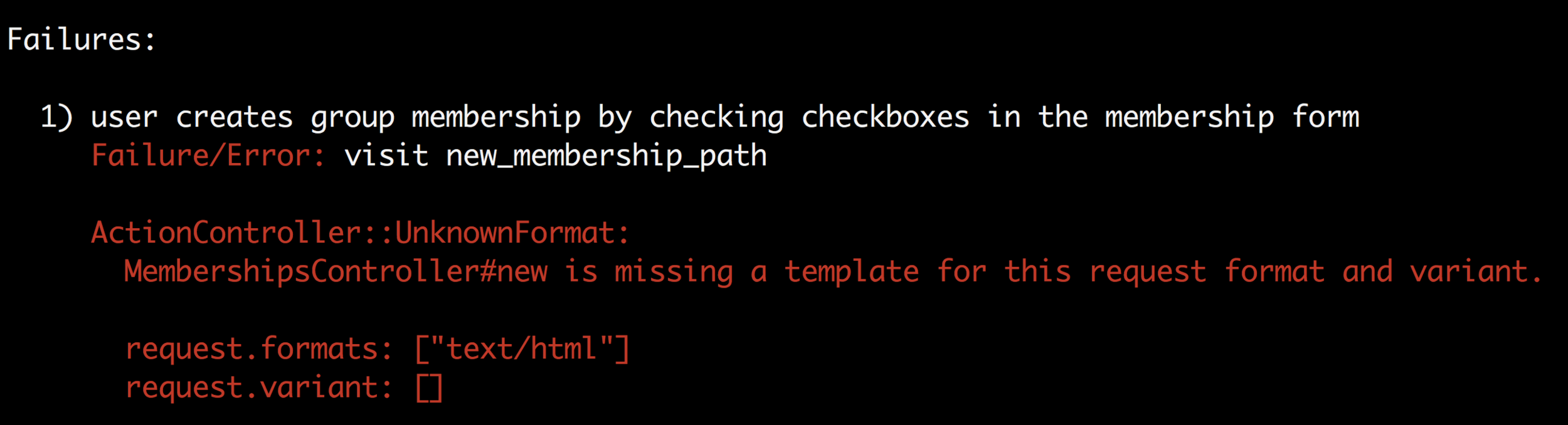
We need to declare a membership instance variable back in our controller with the following:
# app/controllers/membership_controller.rb
class MembershipsController < ApplicationController
  def new
    @memberships = Membership.new()
  end
end
Now when we run our test we get the following error:

Step 12: Add a Create Route
Now we need to add a route that matches the missing membership_path where are form is making its post request.
# config/routes.rb
Rails.application.routes.draw do
  resources :memberships, only: [:new, :create]
end
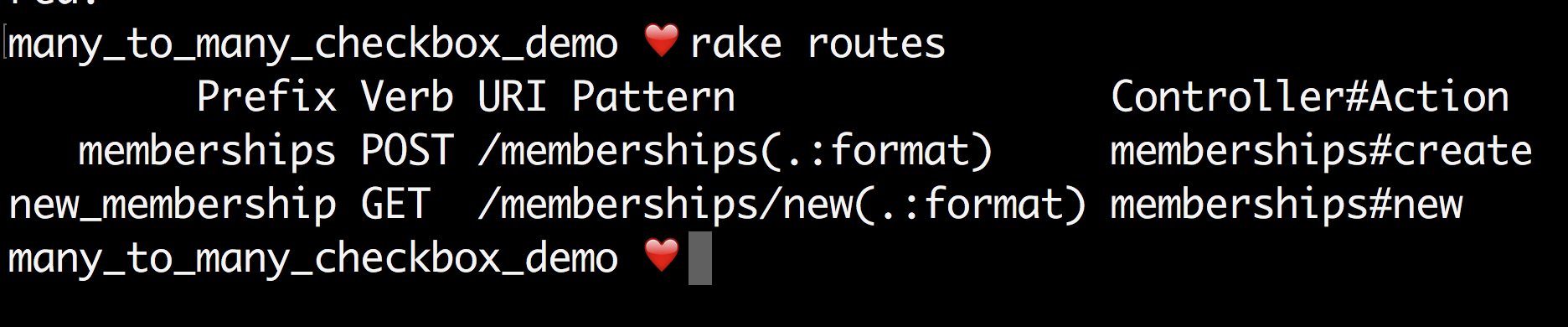
Which will create the following routes:
Step 13: Fake a User
Now when we run the test, we get the following error:
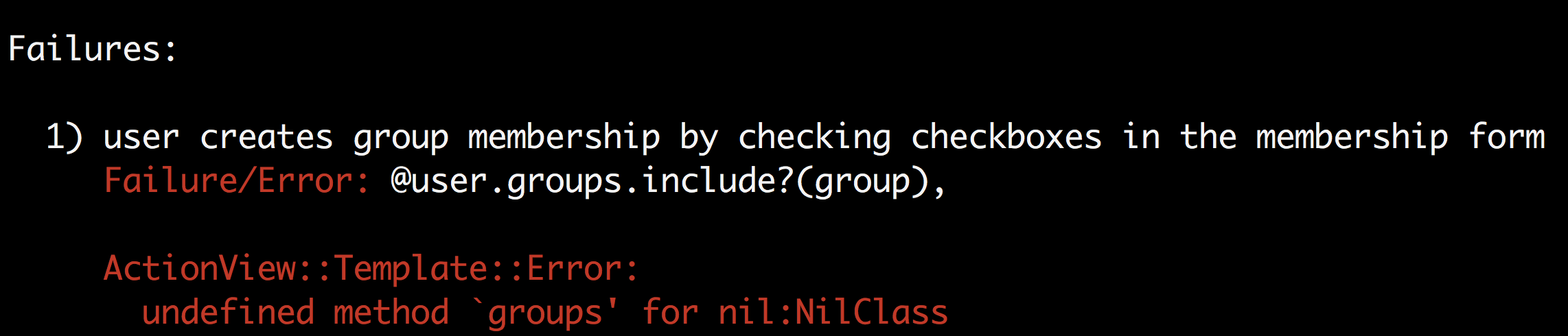
The problem is that @users is not a thing because there is not a current user in our application. Calling the method groups on something that is undefined produces the above error. Since I'm not building any authentication in this app (because the purpose is only to show how to set up check boxes for a many to many relationship), I'm going to add a mock to my test that will set the current user to be the single user created in the test by adding the following code:
allow_any_instance_of(ApplicationController).to receive(:current_user).and_return(user)
The above line says that anytime the method "current_user" is called in any of this application's controller files, respond with the user object.
The updated feature test will look like this:
# spec/features/user_creates_membership_spec.rb
require 'rails_helper'

RSpec.describe "user creates group membership" do
  scenario "by checking checkboxes in the membership form" do
    #test setup: create a user in the database, create a group
    user = create(:user)
    group = create(:group)
    # Mock a login which says anytime we call
    # the method current_user in a controller
    # return the user we created above.
    allow_any_instance_of(ApplicationController).to receive(:current_user).and_return(user)
    # Go to the new membership form
    visit new_membership_path
    # find the checkbox for the group we just created and check it
    # we find the checkbox by the id of the checkbox, which is set to
    # the id of the group
    find("##{group.id}").set(true)
    # submit the form
    click_button "Save changes"
    # Expect the current page to be the user profile page
    expect(current_path).to eq(user_path(user))
    # Look inside the div with id memberships
    within "div#memberships" do
      # expect to find the name of the group that we just added
      expect(page).to have_content(group.name)
    end
  end
end
I will add an @user to the members_controller:
# app/controllers/memberships_controller.rb
class MembershipsController < ApplicationController
  def new
    @memberships = Membership.new()
    @user = current_user
  end
end
And I will add a definition of the current_user method in my application_controller.rb. This method does not do anything because I do not really care about authentication in this application. When the test runs it is going to call current_user and return a user object.
# app/controllers/application_controller.rb
class ApplicationController < ActionController::Base
  protect_from_forgery with: :exception

  def current_user

  end
end
Step 14: Add a Create Method
Running the test now shows that our next step is to write a create method in our memberships controller.
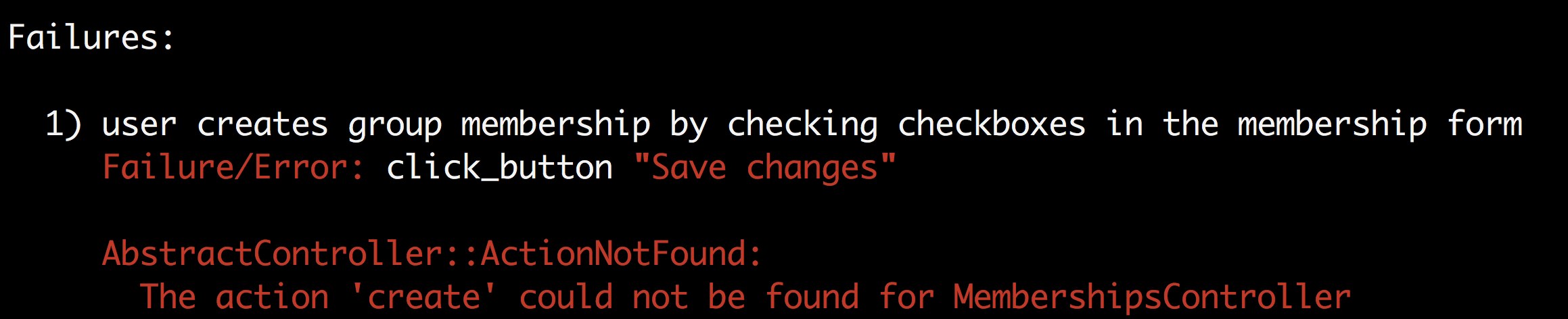
We can do so by implementing:
# app/controllers/memberships_controller.rb
class MembershipsController < ApplicationController
  def new
    @memberships = Membership.new()
    @user = current_user
  end

  def create
  end
end
Step 15: Implement a Membership Manager
Single purpose controllers are a hallmark of well designed Rails applications. Iterating over the checked groups and creating or destroying the appropriate memberships is functionality that does not belong in our controller.
I'm going to create MembershipManager class.
mkdir app/services
touch app/services/membership_manager.rb
mkdir spec/services
touch spec/services/membership_manager_spec.rb
Keep in mind that when our form submission comes in, we have an array of group id's to work with. If a checkbox is submitted as unchecked, we will have an empty string in our array. Based on that I know that I want the MembershipManager class to be initialized with an array of group_ids that mimics the types of form submissions I anticipate handling.
Our spec file should look something like this:
# spec/services/membership_manager_spec.rb
require 'rails_helper'

RSpec.describe MembershipManager do
  it "has group_ids and a user" do
    group_ids = ["", "2"]
    user = create(:user)
    manager = MembershipManager.new(group_ids, user)

    expect(manager.group_ids).to eq(group_ids)
    expect(manager.user).to eq(user)
  end

  it "can remove blank group_ids" do
    group_ids = ["", "2"]
    manager = MembershipManager.new(group_ids, nil)

    expect(manager.clean_groups).to eq(["2"])
  end

  it "can finds groups from group_ids" do
    group = create(:group)
    group_ids = ["", group.id]
    manager = MembershipManager.new(group_ids, nil)

    expect(manager.checked_groups).to eq([group])
  end

  it "can find unchecked groups" do
    checked_group = create(:group)
    unchecked_group = create(:group)
    group_ids = ["", checked_group.id]
    manager = MembershipManager.new(group_ids, nil)

    expect(manager.unchecked_groups).to eq([unchecked_group])
  end

  it "can create memberships from checked groups" do
    user = create(:user)
    checked_group = create(:group)
    unchecked_group = create(:group)
    group_ids = ["", checked_group.id]
    manager = MembershipManager.new(group_ids, user)

    manager.create_memberships_from_checked_groups
    memberships = user.memberships

    expect(memberships.count).to eq(1)
    expect(memberships.first.group).to eq(checked_group)
  end

  it "can removes destroy unchecked memberships" do
    group_1 = create(:group)
    group_2 = create(:group)
    group_3 = create(:group)
    user = create(:user)
    create(:membership, group: group_1, user: user)
    group_ids = ["", group_2.id, ""]

    manager = MembershipManager.new(group_ids, user)

    manager.destroy_memberships_from_unchecked_groups

    expect(user.memberships.count).to eq(0)
  end

  it "will create checked memberships and destroy unchecked memberships" do
    group_1 = create(:group)
    group_2 = create(:group)
    group_3 = create(:group)
    user = create(:user)
    create(:membership, group: group_1, user: user)
    group_ids = ["", group_2.id, group_3.id]

    MembershipManager.new(group_ids, user).run

    user.memberships.each do |affiliation|
      expect([group_2, group_3]).to include(affiliation.group)
    end
  end
end
And in our membership_manager.rb file we can implement:
# app/services/membership_manager.rb
class MembershipManager
  attr_reader :group_ids, :user
  def initialize(group_ids, user)
    @group_ids = group_ids
    @user = user
  end

  def clean_groups
    group_ids.reject { |id| id == "" }
  end

  def checked_groups
    clean_groups.map { |id| Group.find(id) }
  end

  def unchecked_groups
    Group.all.reject { |group| checked_groups.include?(group) }
  end

  def create_memberships_from_checked_groups
    checked_groups.each do |group|
      Membership.find_or_create_by(group: group, user: user)
    end
  end

  def destroy_memberships_from_unchecked_groups
    unchecked_groups.each do |group|
      membership = Membership.find_by(group: group, user: user)
      membership.destroy if membership
    end
  end

  def run
    create_memberships_from_checked_groups
    destroy_memberships_from_unchecked_groups
  end
end
And when we run the test file
rspec ./spec/services/membership_manager_spec.rb
We get:
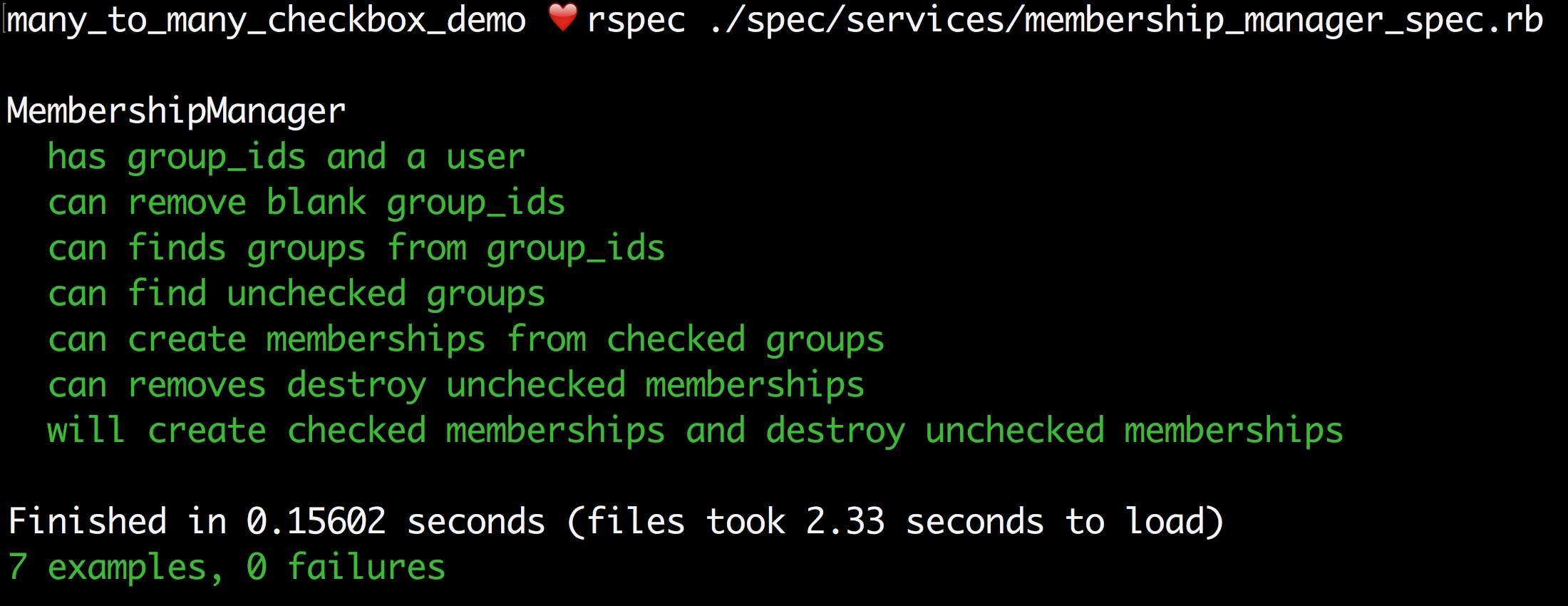
And we can use this code back in our controller to handle the creation of memberships when a form is submitted.
Step 16: Finish the Create action
# app/controllers/memberships_controller.rb
class MembershipsController < ApplicationController
  def new
    @memberships = Membership.new()
    @user = current_user
  end

  def create
    MembershipManager.new(params[:user][:group_ids], current_user).run
    rendirect_to user_path(current_user)
  end
end
The params[:user][:group_ids] is how we access the array of group_ids submitted through the form. The current_user is the dummy method we previously created.
When we run RSpec we get:

Step 17: Make a User Show
Let's create the route our test specified:
# config/routes.rb
Rails.application.routes.draw do
  resources :memberships, only: [:new, :create]
  resources :users, only: [:show]
end

And now when we run our test again we get:
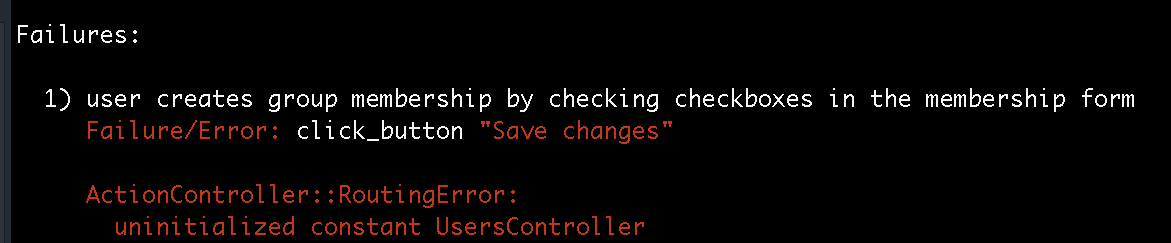
And now we need to create a UsersController.rb:
touch app/controllers/users_controller.rb
Into which we add:
# app/controllers/user_controller.rb
class UsersController < ApplicationController
  def show
    @user = current_user
  end
end
And when we run our test we get:
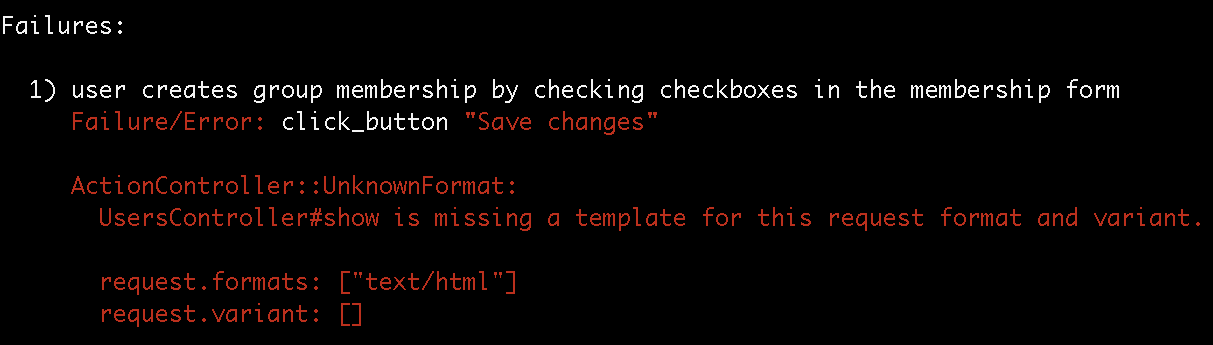
We next create a show view:
mkdir app/views/users
touch app/views/users/show.html.erb
And run our test:
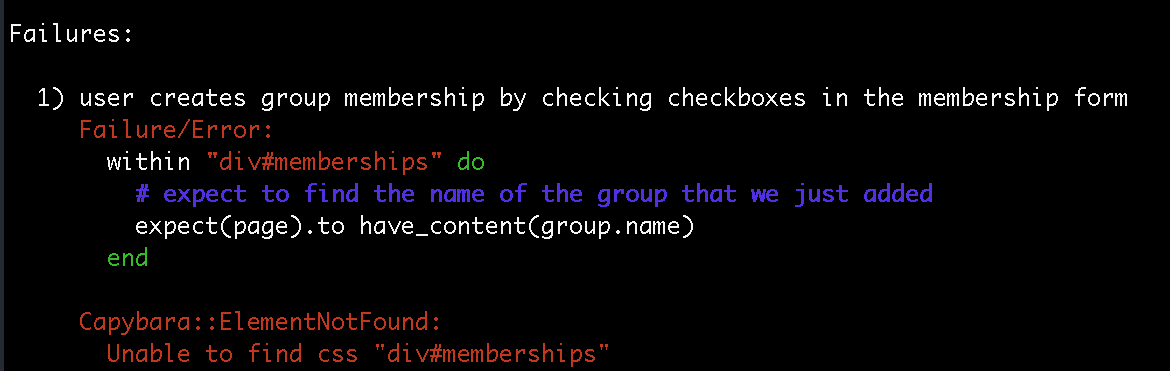
We next add the following code to our show page:
<h1>Your memberships</h1>
<div id="memberships">
  <ul>
    <% @user.groups.each do |group| %>
      <li><%= group.name %></li>
    <% end %>
  </ul>
</div>
And our tests are passing!